
# Background
The function provided by pre-rendering can only solve the problem of white screen, but this content is actually just a frame generated by css and html, and there are problems such as the structure of the page and the actual inconsistency, and excessive white space.
# Principle
Based on a scheme for automatically generating skeleton screens (opens new window), I modified [skeleton](https://github.com/ElemeFE /page-skeleton-webpack-plugin/tree/master/src/script) code, when the Google plug-in is loaded, inject it into the page, select the current element, run outputSkeleton, you can get the html&css of the skeleton screen
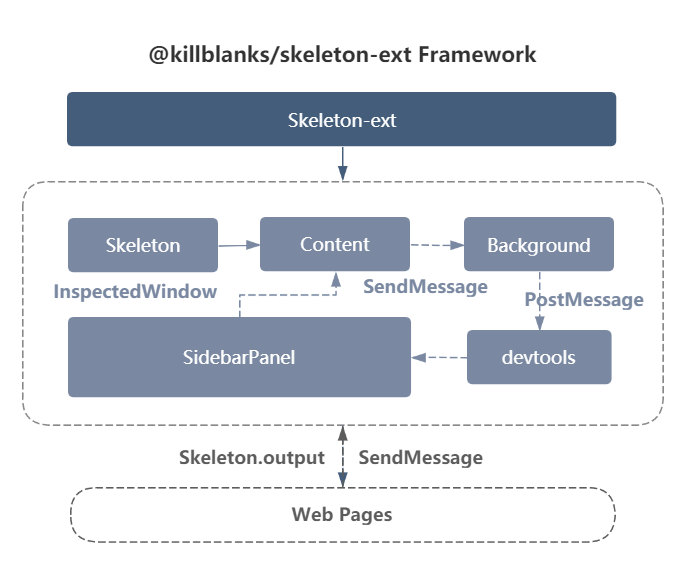
# Frame
# Quick start
# 1. Install
Two ways to install are currently recommended
# 1.1 Google Store (not currently available)
# 1.2 Local installation
git clonekillblanks (opens new window)
git clone https://github.com/warpcgd/killblanks.git
Open
chrome:extensions, checkDeveloper mode, clickLoad decompressed extension program, select thekillblanks/packages/skeleton-chrome-ext/distfolder in the clone source codeVideo tutorial
# 2. Use
Open
dev-toolsSwitch to
ElementtabClick the
Select Elementbutton to select any elementFind
SKELETONinsidebarClick on render
Video tutorial